CPU, GPU, or NPU: Picking the Right Silicon for Your Home AI Projects in 2024
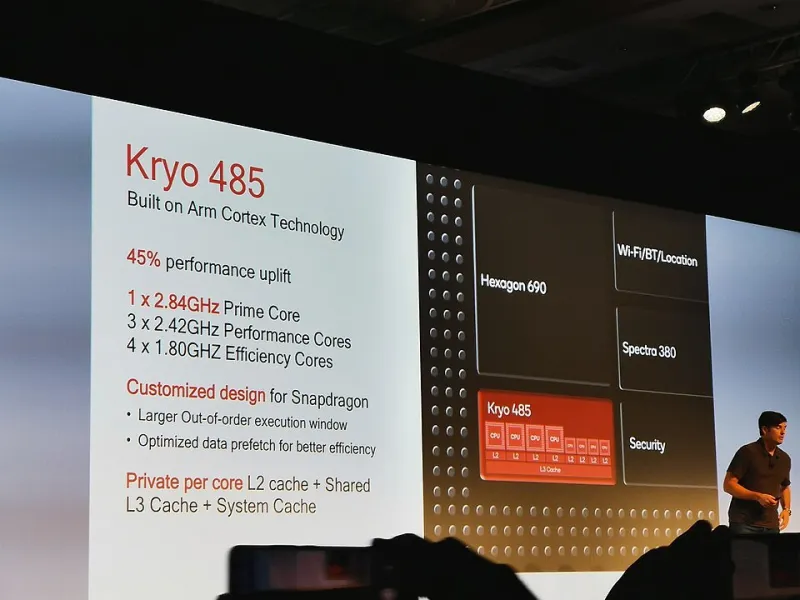
Photo: Mario Tomás Serrafero, CC BY-SA 4.0, via Wikimedia Commons
Not long ago, running any kind of machine learning model at home meant either waiting forever on a CPU or dropping serious cash on a gaming GPU. The landscape in 2024 looks completely different. NPUs are showing up in consumer laptops. Dedicated AI accelerator boards are available for under $100. Even mid-range CPUs are holding their own for certain inference tasks.
If you're a maker trying to build something with AI — whether that's a robot that recognizes objects, a home assistant that runs locally, or an edge device that classifies sensor data — you've got real choices to make. And the wrong choice can mean either burning money on hardware you don't need or bottlenecking a project that could've run great on cheaper silicon.
Let's cut through the noise.
What Are We Actually Comparing?
Before getting into benchmarks and recommendations, it's worth being precise about what these three processor types actually do differently.
CPUs (Central Processing Units) are general-purpose processors. They handle a few tasks at a time extremely well, with deep logic pipelines optimized for sequential operations. Modern CPUs — think AMD's Ryzen 7000 series or Intel's Core Ultra lineup — have gotten surprisingly capable at AI inference tasks, partly through wider SIMD instruction sets and partly through raw clock speed improvements.
GPUs (Graphics Processing Units) were originally built to push pixels, but their massively parallel architecture turned out to be almost perfectly suited for the matrix math at the heart of neural networks. NVIDIA's CUDA ecosystem in particular became the de facto standard for AI training and inference. For makers, the RTX 3060 through RTX 4070 range represents a sweet spot between price and capability.
NPUs (Neural Processing Units) are the newcomers in the consumer space. These are dedicated silicon blocks designed specifically to accelerate the specific types of operations neural networks use — matrix multiplications, activation functions, and so on — while consuming far less power than a GPU doing the same work. You'll find them in Apple's M-series chips, Qualcomm's Snapdragon X Elite, Intel's Meteor Lake and Lunar Lake CPUs, and dedicated edge boards like the Google Coral and Hailo-8.
The Performance Picture
For AI training — actually teaching a model from scratch or fine-tuning a large one — GPUs still win decisively and it's not particularly close. Training even a modest computer vision model on a CPU will take hours where a mid-range GPU takes minutes. NPUs are generally not designed for training workloads at all; they're inference-focused by nature.
If training is a core part of your project workflow, a GPU is the right call. An RTX 3060 12GB can be found used for around $250-300 and handles most hobbyist training tasks well. The 12GB VRAM is important — models are getting larger, and running out of VRAM is a frustrating wall to hit.
For inference — running a trained model to get predictions — the comparison gets much more interesting.
On a pure speed basis for larger models (think 7B+ parameter LLMs or complex vision transformers), GPUs still lead. But for the kind of models most makers are actually deploying on edge devices — YOLOv8 for object detection, MobileNet for image classification, Whisper for speech recognition — NPUs and even capable CPUs are genuinely competitive, and they do it at a fraction of the power draw.
In practical terms: a Hailo-8 NPU module running on a Raspberry Pi 5 can hit 26 TOPS (tera-operations per second) for object detection tasks at under 2.5 watts. An RTX 4060 will absolutely smoke that in raw throughput, but it's also pulling 115 watts under load and costs ten times as much. For a battery-powered robot or a small enclosure project, that trade-off matters enormously.
Breaking It Down by Project Type
Computer Vision (Object Detection, Classification, Segmentation)
This is probably the most common AI use case in the maker world, and it's where NPUs really shine. If you're building something like a smart bird feeder camera, a parts-sorting machine, or a security system that runs locally, a Raspberry Pi 5 paired with the Hailo-8 AI HAT+ is an incredibly compelling setup in 2024. It handles real-time YOLOv8 inference at 30fps with models that would bring a CPU to its knees.
For more complex vision tasks — segmentation, depth estimation, multi-model pipelines — a GPU starts making more sense, particularly if you're working from a desktop or laptop rather than an embedded system.
Recommendation: NPU (Hailo-8 / Google Coral) for embedded vision; GPU for complex desktop vision work.
Local LLM and Language Models
Running large language models locally has become a legitimate maker activity thanks to tools like Ollama and LM Studio. For this use case, VRAM is king. A GPU with 12GB+ VRAM will run 7B and even some 13B parameter models at usable speeds. CPUs can do it too — llama.cpp is surprisingly optimized — but you're looking at tokens-per-second speeds that feel sluggish for interactive use.
NPUs are starting to enter this space (Qualcomm's Snapdragon X Elite has demonstrated on-device LLM inference), but the software ecosystem is still maturing. By 2025 this picture will probably look different, but right now GPUs and high-end CPUs dominate local LLM work.
Recommendation: GPU (RTX 3060 12GB or better) for the best experience; modern CPU with 32GB+ RAM as a budget-friendly alternative.
Robotics and Edge Inference
Robotics projects often run on battery power, live in tight enclosures, and need real-time response. This is the NPU's home turf. The NVIDIA Jetson series (particularly the Jetson Orin Nano) offers an interesting hybrid — a capable ARM CPU, a small GPU, and dedicated deep learning accelerators on a single SOM (System on Module). It's more expensive than a Pi + Hailo combo but offers more flexibility.
For purely inference-focused robots, the Pi 5 + Hailo-8 setup is hard to beat on value. For robots that need to train or adapt in the field, you'll want the Jetson's more complete compute stack.
Recommendation: Jetson Orin Nano for flexible robotics; Pi 5 + Hailo for dedicated inference robots.
Cost Reality Check
Here's a rough breakdown of what you're actually spending:
- Budget CPU path: Existing PC + 32GB RAM — $0 to $150 extra. Solid for experimentation and small model inference.
- GPU path: Used RTX 3060 12GB — ~$260. Best all-around choice if you're training models or running LLMs.
- Edge NPU path: Raspberry Pi 5 (8GB) + Hailo-8 AI HAT+ — ~$120 total. Best for embedded and battery projects.
- Jetson Orin Nano 8GB Developer Kit — ~$499. The professional embedded AI option.
So Which One Do You Actually Need?
Here's the honest answer: it depends almost entirely on where your project lives and what it needs to do.
If your AI project sits on a desk and you need to train models, buy a GPU. If it's a robot or a camera device that needs to run lean and fast on inference alone, look hard at the NPU options — they've gotten genuinely good. And if you're just starting out and want to experiment with ML before committing to hardware, your existing CPU can take you further than you might expect.
The good news for makers in 2024 is that there's no bad choice anymore — just different trade-offs. Pick the one that matches your project's constraints, and go build something.