The Zero-Dollar EDA Bill Comes Due: Five Free PCB Tools, One Board, and a Weekend Lost to Exports
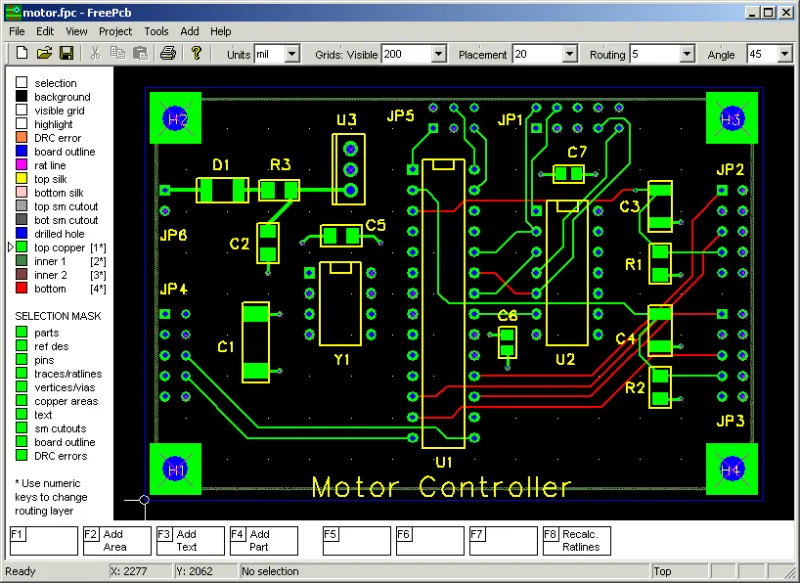
Photo: The original uploader was Remember the dot at English Wikipedia., GPL, via Wikimedia Commons
The board and the rules
Free PCB software is one of the best things about being a maker in 2026. You can go from a schematic idea to a fab-ready board without paying a license fee. You can also lose a weekend to a Gerber export that looks fine until the fab house asks why your drill file is empty.
We rebuilt the same moderate board in five free packages: KiCad, EasyEDA, LibrePCB, Horizon EDA, and Fritzing. The board was a 60 mm by 40 mm two-layer design with an MCU, USB-C input, a buck converter, a relay driver, and about 80 components. We did not try to make the schematics identical down to the net names. We tried to make the manufacturing data identical enough to quote and build.
What free means now
Free is not one thing. Some tools are open source and run locally. Some are free cloud accounts with paid tiers for private projects or advanced features. Some are free until you need a specific export, a shared library, or a support ticket. None of that is evil, but it changes the real cost of a project.
The biggest hidden cost is not the license. It is the time you spend learning where the tool hides the layer stack, how it names drill files, and whether its library parts actually match the footprints you solder.
Export results
| Tool | Gerbers | Drill | BOM and pick-and-place | Main catch |
|---|---|---|---|---|
| KiCad | Clean | Separate drill files | CSV export works | DRC setup takes patience |
| EasyEDA | Clean | Separate drill files | Good if you use its libraries | Cloud library lock-in |
| LibrePCB | Clean | Included in job output | Usable but basic | Smaller library |
| Horizon EDA | Clean after setup | Needs manual review | Possible but rough | Steep learning curve |
| Fritzing | Basic | Limited | Weak for assembly | Not a production tool |
The surprising part was not that the open-source tools worked. It was how much of the weekend went into checking whether they worked. KiCad gave us the most predictable output once the board was set up. EasyEDA was fast, but several parts were tied to a cloud library and the footprints needed checking. LibrePCB was clean and simple, with a smaller library that made us hunt for a relay driver. Horizon EDA was powerful and unfriendly in equal measure. Fritzing was fine for a sketch and out of its depth for a real assembly.
Library lock-in is the real trap
A free tool becomes expensive when your parts live only inside it. EasyEDA is the obvious example because its library is tied to a cloud ecosystem, but the problem is broader. If your symbols and footprints are stored in a format that no other tool reads, switching costs are real. You may not care on a one-off board. You will care when you want to move the design to a different tool or hand it to a contract manufacturer.
KiCad and LibrePCB were easier to move because their libraries are local and the file formats are documented. Horizon EDA was also local, but the library workflow felt like it was designed for people who enjoy reading changelogs. Fritzing was the weakest for production because its parts library is aimed at breadboard-style projects, not assembly-ready boards.
DRC does not mean what you think
Every tool has a design rule check. They do not agree on what a design rule is. One tool flagged silkscreen over pads as an error. Another ignored it. One wanted a minimum annular ring that was tighter than our fab house required. Another buried the setting three menus deep.
We ended up running every export through an independent Gerber viewer and a fab quote before we trusted it. That step caught a missing soldermask layer on one export, a drill file that needed a separate merge, and a silkscreen reference that had drifted off its pad. None of those were fatal. All of them would have been annoying after a paid order.
How to de-risk a free workflow
Export early and often. Open the Gerbers in a viewer that is not made by the same company as your EDA tool. Keep a netlist and a BOM outside the tool. Document your stackup and finish in a text file that travels with the project. If you use a cloud library, download the symbols and footprints and check them against the datasheet.
Free PCB software is not a trap by itself. The trap is assuming that free means portable, and that a clean-looking export means a manufacturable board. Spend an hour checking the output before you spend a weekend wondering why the fab house cannot build it.