Reprogram Everything: How Affordable FPGA Boards Are Unleashing a New Wave of Maker Creativity
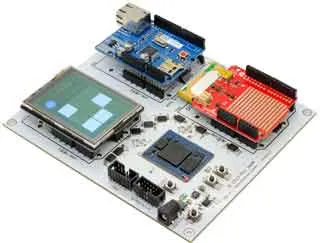
Photo: Brentsinger, CC BY-SA 3.0, via Wikimedia Commons
For a long time, FPGAs were the kind of hardware that showed up in conversations between defense contractors and silicon engineers — not exactly the stuff of weekend maker projects. They were expensive, the toolchains were brutal, and the learning curve felt less like a slope and more like a cliff face. Then something shifted. Affordable dev boards started hitting the market, open-source tooling matured, and suddenly a whole new crowd of tinkerers started asking: wait, can I just... reprogram my chip?
Yes. Yes, you can. And it's kind of a big deal.
What Even Is an FPGA?
Before we get into the gear, let's make sure we're on the same page. A field-programmable gate array is essentially a chip full of configurable logic blocks. Unlike a microcontroller or a CPU — where the silicon is baked into a fixed architecture — an FPGA lets you define the actual hardware behavior using a hardware description language like VHDL or Verilog. You're not writing software that runs on hardware. You're describing the hardware itself.
That distinction matters more than it might seem at first. Want to build a custom UART controller with a very specific timing requirement? Do it in logic. Want to prototype a retro game console's video pipeline? Describe it in gates. Need to process sensor data in parallel at speeds no microcontroller can touch? FPGAs eat that for breakfast.
The tradeoff has always been complexity — and cost. But both of those barriers are coming down fast.
The Boards That Changed the Game
A few platforms deserve credit for dragging FPGAs into the maker mainstream. Let's look at the ones worth your attention right now.
Lattice iCEstick and the iCE40 Family
If you want to start cheap and stay sane, Lattice's iCE40-based boards are where most makers land first. The iCEstick retails for around $25 and plugs straight into a USB port. More importantly, the iCE40 was the first major FPGA family to get a fully open-source toolchain — Project IceStorm — meaning you don't need to install a 30GB proprietary IDE just to blink an LED.
The ECP5-based boards, like the OrangeCrab or Lattice's own ECP5 Evaluation Board, step things up considerably. You get more logic elements, proper DDR3 support, and enough headroom to implement real CPU cores or video controllers. The open toolchain (nextpnr + Yosys) works here too, which keeps the workflow clean and approachable.
Lattice has become something of the community darling for good reason: they've leaned into the hobbyist ecosystem rather than fighting it.
Xilinx (Now AMD) Artix-7 and the Digilent Ecosystem
On the other end of the spectrum, Xilinx's Artix-7 series — available through Digilent's Basys 3 and Arty A7 boards — gives you access to the same silicon architecture used in professional prototyping environments. Digilent's boards run $79 to $149 depending on configuration, and they come with solid documentation, a huge library of example projects, and integration with Xilinx's Vivado Design Suite.
Vivado is proprietary and hefty, but the free WebPACK edition covers everything you need for Artix-7 development. If you're planning to eventually work in an industry environment or want your skills to translate directly to a resume, learning on Xilinx hardware is a smart move. The toolchain is more complex, but the payoff is real.
The Arty A7 in particular has become a favorite for soft-core CPU projects — people are running RISC-V cores on these things and then loading Linux on top of them. That's not a joke. That's a $99 board running a processor you defined in HDL.
Tang Nano and the Budget Tier
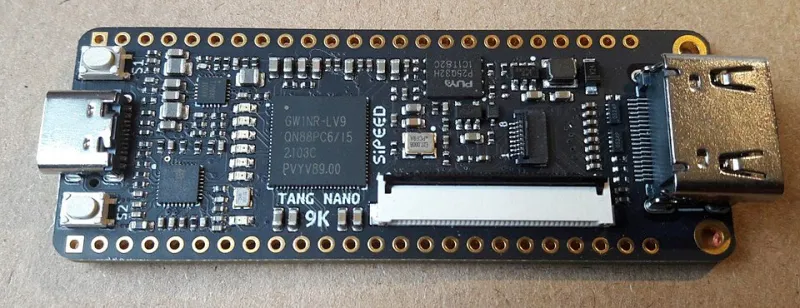
For the truly budget-conscious, Sipeed's Tang Nano series (based on Gowin FPGAs) has started appearing on shelves for under $10. The tooling is less mature and the community is smaller, but these boards are genuinely capable for learning HDL and simple logic projects. If you just want to understand how FPGAs work before committing to a bigger board, the Tang Nano 9K is a surprisingly solid entry point.
Real Projects Makers Are Actually Building
So what are people doing with all this reconfigurable silicon? Quite a lot, it turns out.
Retro console emulation at the hardware level is huge in the FPGA community. Projects like MiSTer FPGA use a Terasic DE10-Nano board to recreate classic arcade hardware — not through software emulation, but through actual gate-level recreation of the original chips. The result is cycle-accurate behavior that software emulators struggle to match. Retro gaming purists love it.
Custom video processing pipelines are another killer use case. Makers are building HDMI scalers, scan converters, and even custom display controllers for unusual panel interfaces — the kind of timing-sensitive work that would be impossible on a microcontroller.
High-speed data acquisition is where FPGAs genuinely leave everything else in the dust. If you're building a logic analyzer, an oscilloscope front-end, or a software-defined radio, the parallel processing capability of an FPGA means you can handle data rates that would saturate any ARM core.
Demystifying the Learning Curve
Here's the honest take: FPGAs are harder to learn than Arduino. That's just true. But the learning curve is more manageable than it was five years ago, and the community resources have gotten genuinely good.
Start with Verilog rather than VHDL if you're coming from a software background — the syntax feels more familiar. Work through the free tutorials on Nandland.com (seriously, bookmark it now) and grab a copy of Digital Design and Computer Architecture by Harris & Harris if you want a solid theoretical foundation.
The real mindset shift is moving away from sequential thinking. In software, things happen one after another. In HDL, everything you describe happens simultaneously, in parallel, every clock cycle. Once that clicks, the rest starts to make sense.
Should You Jump In?
If you've ever hit the ceiling of what a microcontroller can do — if you've found yourself fighting timing constraints, wishing you could parallelize an operation, or wanting to prototype custom digital logic without spinning a full ASIC — then yes, absolutely, it's time to grab a dev board and start learning HDL.
The FPGA space has never been more accessible, the tooling has never been more open, and the maker community around these platforms is genuinely enthusiastic and helpful. The silicon is waiting. Go tell it what to be.